MyLO - My Learning Online
New Grades display when marking in Assessments
With the December release of Brightspace, the Consistent Evaluation experience has been updated to provide instructors the ability to view the grade scheme that is applied to students in real time, based on the grade they enter during the evaluation process. For example, if the grade scheme applied to a unit is a Letter Grade - such as UTAS Grades, instructors can view that letter grade instantly when marking assessments in the Assignment, Discussions or the New Quiz experience (Opt-In from January). The instructor can also choose to Hide Student Preview of Grade or Show Student Preview of Grade directly from the evaluation experience. This is on by default.
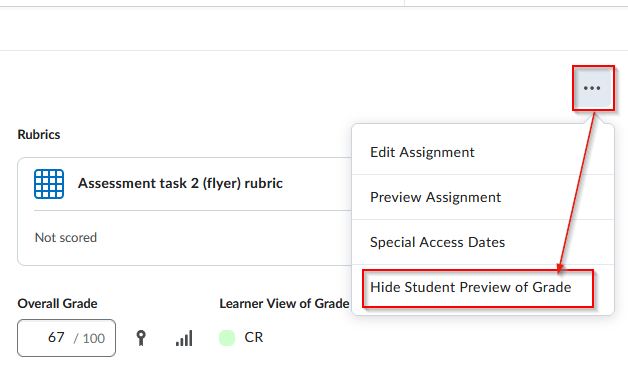
Previously, instructors could not view the applied grade scheme grade when evaluating a submission. This work was instead done by MyLO Mate.
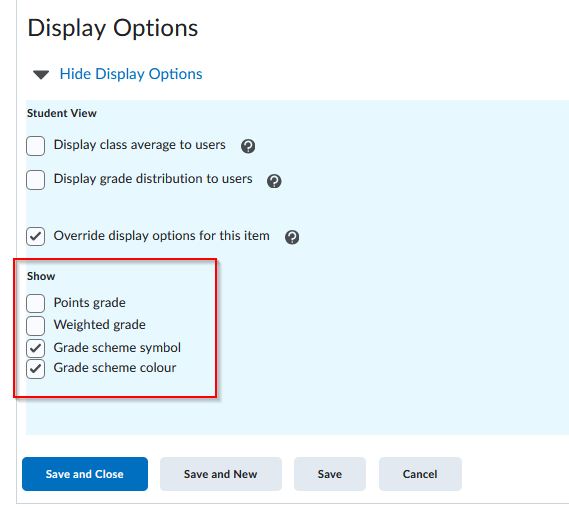
MyLO Mate will now retire this feature, now that it is available within Brightspace itself. The display settings within the assessment match those in the grade book - therefore whatever settings you have for the grade item for your students will be applied here. This includes points/ percentage/ Letter Grade and Grade Scheme colour.
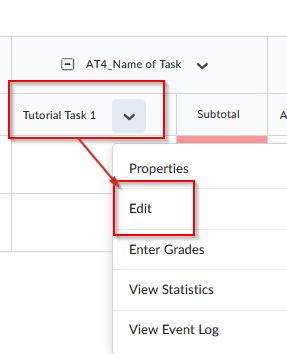
If you wish to change the preview of the grade in the assessment AND the grade which the student will see, you will need to update the grade item for the Student display within Gradebook.