
MyLO - My Learning Online
Delete H5P grade column in MyLO
Note: This guide can only be completed by a user with the support role in a subject.
After a H5P score has been sent to the Gradebook, staff are unable to delete the associated grade column. This guide takes staff with a Support role in the subject through how to delete the grade column.
This task is broken down into three actions:
- Delete the H5P LTI link
- Delete the grade column
- Delete the H5P iframe in content
The first step is to remove the link between H5P and MyLO.
Delete H5P LTI link
- From within the subject, click Unit Admin (screwdriver and spanner icon) on the NavBar
- Click External Learning Tools (under Site Resources if listed in Category view)
Note: if you do not see this link, ensure you are enrolled in the subject with the support role.
- Click the down arrow to the right of the H5P component to remove (see guide below for finding the name of the H5P component if needed)
- Select Delete

- A conformation pop up will appear, click Delete

Now that the link has been removed, you are able to delete the grade column, this will be named the same as the LTI link and the H5P component (unless it has been altered after creation).
Delete the associated grade column
- From within the subject, click Grades from the NavBar
- Click Manage Grades
- Click More Actions
- Select Delete

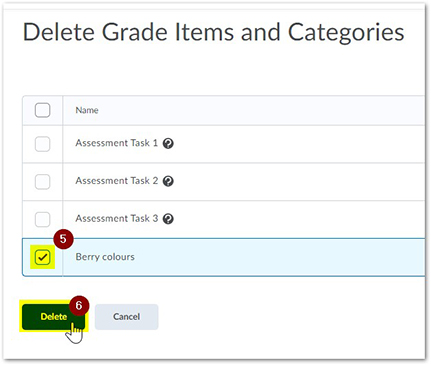
- Click the checkbox to the left of the grade column
- Click Delete
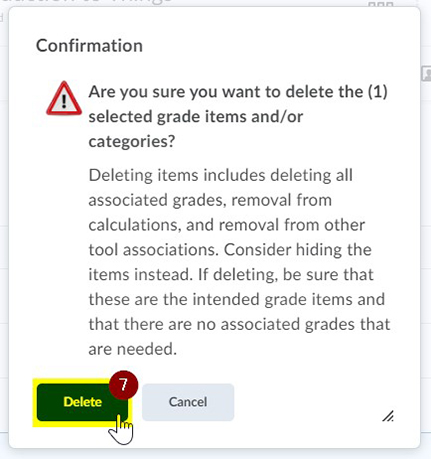
- A confirmation pop up will appear, click Delete
Because the link to the H5P component was deleted, it will no longer display in MyLO. At this point you either need to delete the iframe in MyLO and save or delete the iframe and relink it, deciding first whether you would like a new grade column to be attached.
This is how a broken H5P component will appear once the LTI link has been deleted:

Delete H5P iframe
- From within the subject, navigate to the content page that housed the H5P component
- Click Edit Web Page
- Click HTML Source Editor
- Find the iframe code, highlight and delete it

- Click Save
- Click Save and Close
How to find the name of H5P component
If you are unsure of the name of the H5P component and therefore do not know which H5P LTI link to delete, you can find it by editing the H5P component in MyLO. This will only work if you have ownership or collaboration permissions for the H5P component in H5P
- From within the subject, locate the content page with the H5P component
- Click Edit above the H5P component
From here, the name of the H5P will appear in the Title field.
