
MyLO - My Learning Online
Padlet and Gradebook
How gradebook in padlet works
Gradebook lets you grade posts from your padlet. You can also provide written feedback for each student and view posts grouped by student, which is a new, helpful way to visualise submissions. Once you’ve graded the posts on a padlet, you can download the grades and feedback as a CSV file. If your padlet is created outside of a web-page then you can automatically sync grades and feedback to the Gradebook in MyLO.
If unsure of whether it would be appropriate to use grades in Padlet, please check with your Digital Futures team members
How to add a padlet grade item to MyLO:
In order to sync grades from your padlet into the MyLO gradebook automatically you will need to add your padlet as a link outside of your web-page:
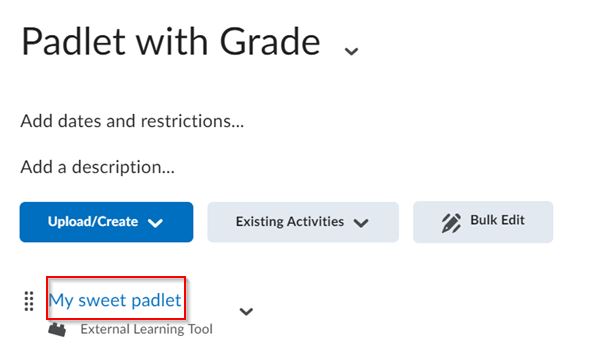
This then automatically creates a grade item in the gradebook. The grade item will be out of 100 with an overall weight of 0. It is best practice to move the grade item under a zero weighted category as shown below:

Accessing and entering grades in padlet:
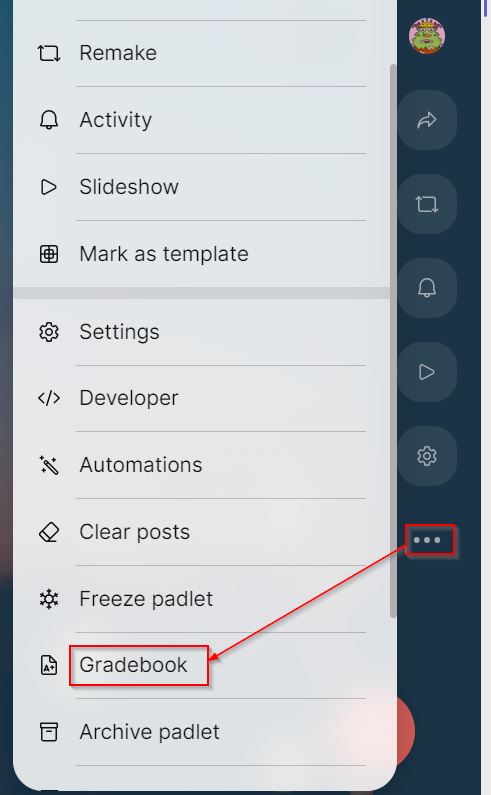
To access gradebook within padlet, click the three dots on your padlet to open the additional actions menu, then click Gradebook.
Enter your grades for each post for each student. It is recommended to not have the sync to LMS option turned on at this point:
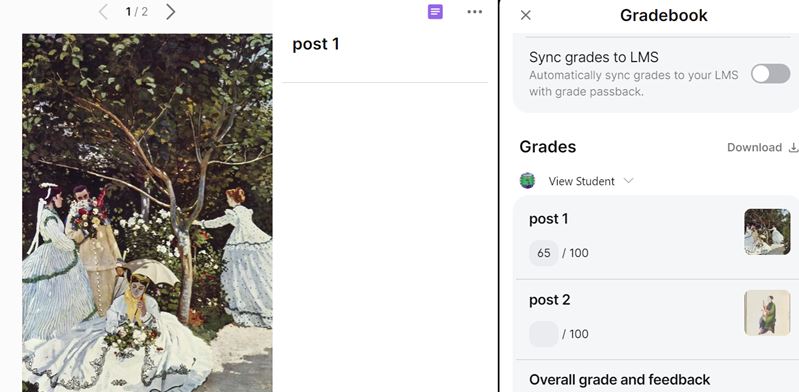
Once all the students are graded you can select the sync to gradebook option. The grade and feedback are sent through to MyLO.
Student view of the Gradebook:
Students can see the grade in MyLO:

Students will also be able to see the grade and feedback within the Padlet, and this can't be hidden
Important Information:
- Padlet sandboxes create a grade item if added outside of a MyLO web-page BUT cannot be graded
- If you create a grade item that is no longer required you can remove by choosing no grade item under the content link and then removing from the gradebook

- If you embed your padlet within a web-page, a grade item will not be automatically created, and the grades will not sync to MyLO. You can download the results.

If you want to use grades you can just create a link to your existing padlet as per the instructions above.
- Padlet grades will round up to the nearest number. Depending on the settings within your gradebook, this can cause a slight numeric difference of a point.
- You can only grade a student on the posts that they have authored; they cannot be graded on their replies that they make to another post.
- You might get a failed to sync message. This is due to padlet wanting to grade lecturers' posts. This is a known issue that will be fixed by the vendor.

- Note that students will be able to access the grades and feedback within the padlet.