
MyLO - My Learning Online
Remaking Padlets
When you copy content from one unit to another- either via using the Previous delivery option in MyLO Manager, or manually via Copy Components in MyLO - this will include any Padlets that you have added as either a link or embedded in a webpage.
In order to ensure that the previous units' posts are kept intact it is important not to just choose to clear the posts in the new unit- as this will remove the posts made by students in the other unit. The process for Padlet re-delivery is in this guide.
Login to Padlet: https://mylo.padlet.org/
Open up the Padlet you wish to remake and open to full screen.
Select Remake:

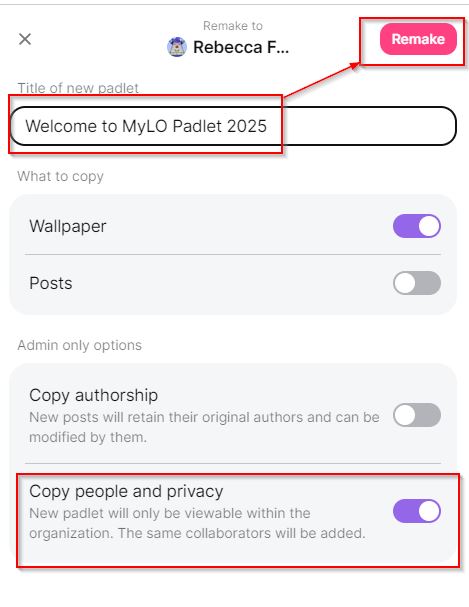
You will be prompted to add a title and specify what to copy, then click Remake. A copy will be created in your Padlet library. Ensure that the same Privacy settings are allocated to the Padlet- that it is Org wide and that visitors can write.
Your new Padlet will be ready to insert into content within your unit as per this guide.