
MyLO - My Learning Online
Automated feedback coach 2.0
What is Automated Feedback Coach 2.0? How is it different from the previous version?
Automated Feedback Coach 2.0 uses advanced Large Language Models provided by Azure OpenAI Service to process students’ input and provide feedback. The Feedback Coach is also available to instructors when giving written feedback if turned on.
Is my data sent to OpenAI to train their language models?
No. Students’ input is only processed by the language models hosted at Azure to generate automated feedback.
The input is never used to train, retrain, or improve any of the Azure OpenAI Service’s Models.
Moreover, we use these models as a “plug-and-play” service. We do not otherwise retrain or fine-tune the models for a specific use case outside of providing custom instructions to the model. In other words, we do not use any student data to retrain, train, or improve our models.
For more information about how your data is processed, please consult our Acai Coach Transparency Note.
How can I enable this feature in a Peer Review or Group Member Evaluation activity as a teacher?
In the Given reviews module, navigate to Guiding students , section. Enable the feature by toggling on the option for "Automated feedback coach."

What does the Automated feedback coach look like when it's working?
After the teacher has enabled the Automated feedback coach feature for a Peer Review or Group Member Evaluation activity, students enrolled in that activity will see "Automated feedback coach" in their feedback giving window when they begin to write reviews for other students.
Once the student starts typing their reviews, the AI coach will process the content and gives feedback to the student. The feedback updates in real time as the student adds on or alters their reviews. Please see the image below for an animated presentation of the functionality.
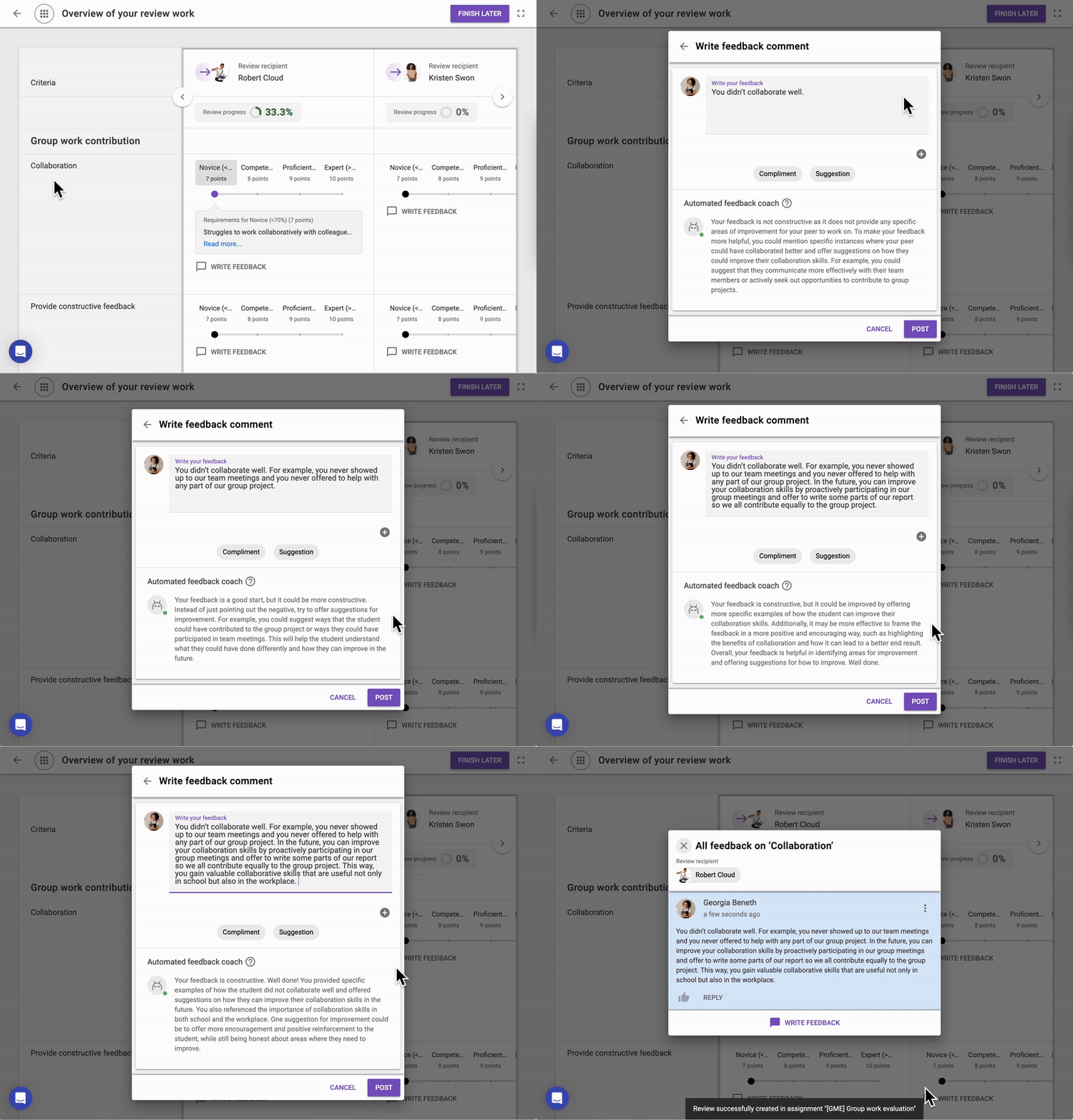
In Peer Review activities, the coach is also available in the sidebar.
Can I choose to not use this feature as a student, even if my teacher has enabled it for me?
Yes, you can disable or enable it any time in your FeedbackFruits preferences.

What is included in your prompt?
A prompt is a set of specific instructions given to a large language model to generate a particular type of response or follow a specified task. Prompts help prime the AI model to know what and how it should respond. Examples of prompts include “Write me a short story about turtles and rabbits”, “Explain the moon landing to me as if I were 10 years old”, or “Help me translate my feedback into Dutch.”
Because prompts contain cues or guidelines that help create a feature, they can also be considered intellectual property. Although we cannot divulge the exact prompt, here are some of the elements included in the prompt for the Automated Feedback Coach 2.0:
Respond in a helpful and coachable way.
Ensure that the feedback addresses the given criteria.
Include the feedback and context (such as the criteria) in a specific format.
Compliment and encourage students to give better feedback.
Do not respond to gibberish, random text, or things that appear unrelated to giving feedback to a peer.
Offer areas of improvement.