
MyLO - My Learning Online
FeedbackFruits - Other Tools
With the move to LTI 1.3, a number of FeedbackFruit assessment options are available for use.
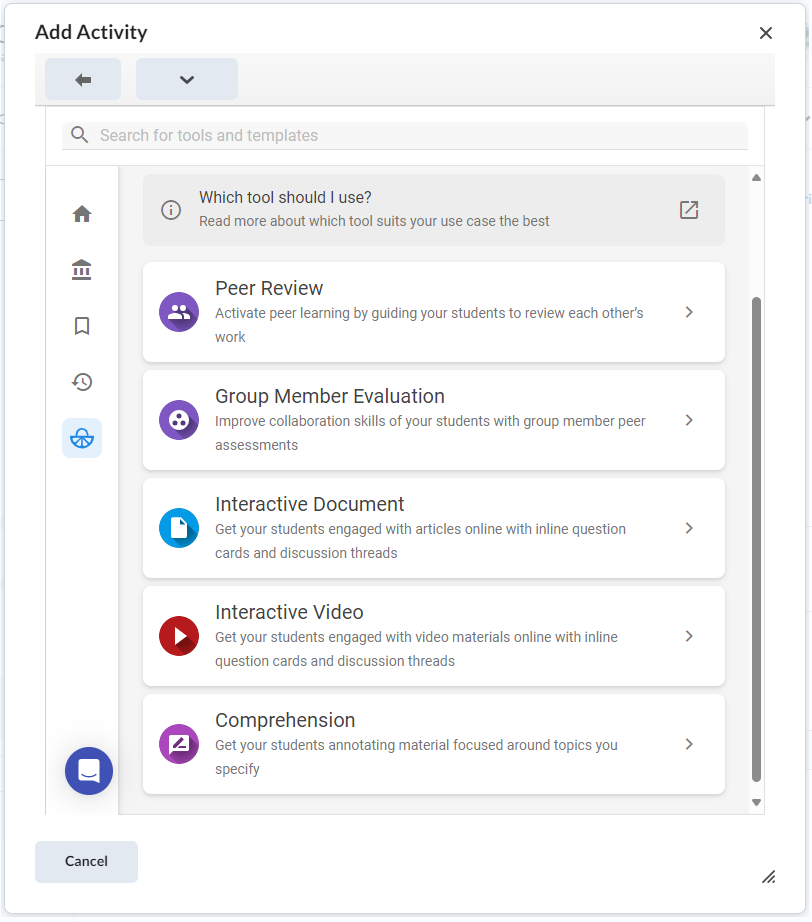
UTAS is licensed for Peer Review, Group Member Evaluation, Interactive Document, Interactive Video and Comprehension only.
Below is a list of the tools with instructions on how to set these up via the FeedbackFruits website.
To add any FeedbackFruits items to your unit:
- Log into MyLO and go to your unit. Press on Content.
- Create a new Module or go to an assessment Module.
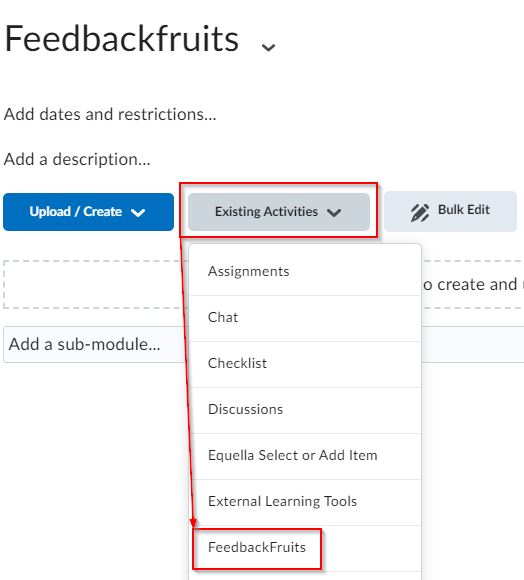
- From Existing Activities select the FeedbackFruits. The first time you add FeedbackFruits you will need to agree to accept the conditions.
- Note: once the link is in content, you can edit the link's title by selecting to edit properties in place.
- Select the tool you wish to use noting UTAS is licensed for Peer Review, Group Member Evaluation, Interactive Document, Interactive Video and Comprehension only
Instructions on the set up of each of the three additional tools are available below: