
MyLO - My Learning Online
Quiz Printer Widget
The Quiz Printer widget allows staff to easily print out to PDF a quiz from within their unit - with or without the answer key. This widget works with the Quiz tool in MyLO and is not intended to be a replacement for it.
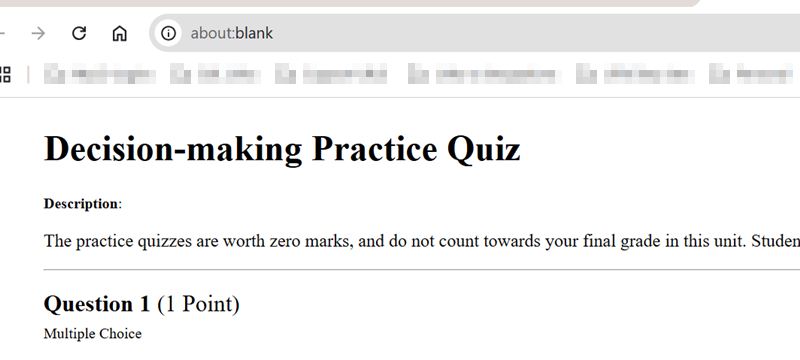
This tool will create an HTML document in your web browser based on your quizzes in your unit, which you can then print directly or copy into a document creation tool for editing.
This will allow staff to give a student a physical copy of a quiz to do, or for an instructor to quickly and easily ensure that the answers within a quiz are correct.
Only staff are able to view the widget on their units.
The Quiz Printer Widget is found underneath the Announcements on the Unit Homepage:

Information about the widget and the different options are found by pressing the blue help icon.
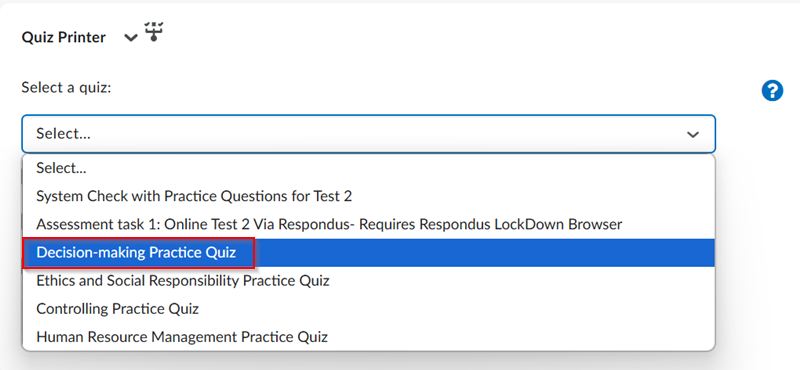
To print out a quiz select the quiz from those that are available within the unit:
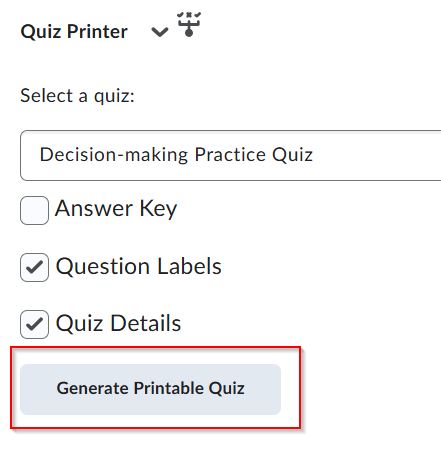
Choose your options and press on Generate Printable Quiz:
This will open in a new tab within your browser. You can then print this to PDF if you need a physical copy.
Known Issues
The Quiz Print Widget is a custom made solution that is not a "core feature" nor is officially supported by D2L. As Brightspace is improved upon, more issues may occur. Here is a list of issues to be aware of while utilising this widget:
- Unsupported Question Types
- Matching
- Ordering
- Arithmetic
- Significant Figures
- Question Sections
- Questions contained in sections will be displayed. Section titles, descriptions, and section level shuffling are not supported features.
- Question Pools
- Questions contained in question pools will not be displayed.
- Rubrics
- Rubrics attached to Written Response questions will not be displayed when the Answer Key option is selected.