
MyLO - My Learning Online
New Quiz Evaluation Experience
The look and feel of the new quiz evaluation experience is consistent with the Assignments and Discussions evaluation experience, making it familiar to markers.
Currently this experience is opt-in. When you press on a quiz attempt to manually grade, you will get a message where you can turn the new experience on: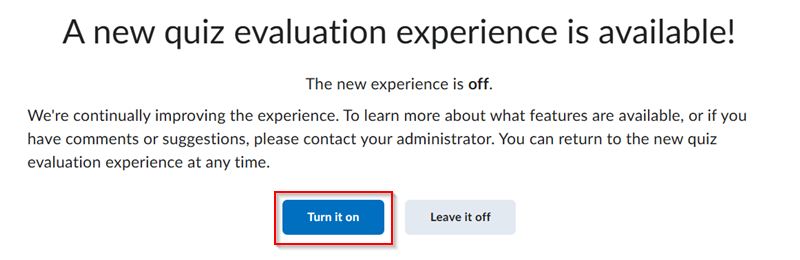
Overview of the New Experience:
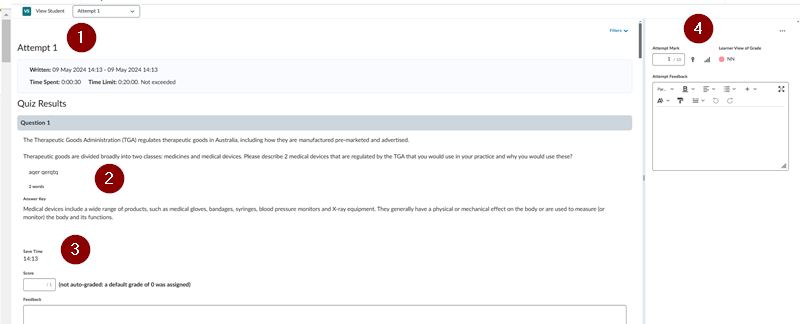
1. The top left panel shows the name of the quiz, the name of the unit, and the name of the student. The Attempt drop-down allows you to select from multiple attempts (if the quiz allows for that) or a Completion Summary. You will also find a summary of the attempt details. The Filters drop-down allows you to filter Quiz Results to show questions that are Pending evaluation or Retaken questions only.
2. The Quiz Results section shows the quiz attempt details like the quiz questions and indications for the correct answer.
3. Add your grade and feedback here for each question. This will update the score within the overall attempt grade for the quiz.
4. The Attempt Grade is auto-calculated with the option to manually override it. Additionally, you have the Attempt Feedback area to provide your feedback to students. Use the top navigation to scroll between students once you have selected to update the grade.
Note: By using the new Quiz experience you also can see the updated grades display.
Supported Question Types
The new quiz evaluation experience currently supports the following quiz Question Types:
- Multiple Choice
- Written Response
- True & False
- Short Answer
- Fill in the Blank
- Multi–Select
- Question Pools with the above question types
Markers will encounter the following notice when evaluating a quiz that contains an unsupported Question Type:

Users have the option to switch back to Classic mode to evaluate question types that are not yet supported in the new quiz evaluation experience.